Recording and Settling Payments

Record payments generated from Contracts on a case-by-case basis, and bundle payments from a specified period to finalize them as Settlements. Manage Royalty, label payments, and additional payments in one place, and calculate the final settlement amount by reflecting even the Minimum Guarantee (MG) conditions.


Who uses it

Role Screen access path
IP Provider (Workspace administrator) Project β†’ Left menu Contracts β†’ Payments or Settlements at the bottom of contract details
Partner (General member) Payments via the same path (read-only; displays own Payments only)

Only IP Provider administrators can register, modify, and delete Payments, as well as start, finalize, and confirm Paid for Settlements. General members can view lists and read details, and Partners can only see Payments related to themselves.


Core Concepts

Payments

These are single financial records generated in Contracts. There are three Payment type types.

Payment type Description
Label fee Label fees calculated based on the label unit price
Royalty Royalty amount calculated by Label issuance. The type used as the basis for MG calculation
Additional Payments that do not fall under the two types above
  • Payments must belong to a Contract and a Partner.
  • They can be linked to Label issuance items (optional).
  • Currency and exchange rates can be recorded together. If the currency is different from the contract's base currency, an exchange rate is required.

Corrective Transactions

Payments generated by issuance are not modified. A counter-transaction of the same amount is added to correct it. This ensures a record remains of what was corrected, when, and for what reason.

The only correction that actually occurs currently is Full reversal. When you perform Reverse the issuance, it is automatically created along with the reason entered at that time. While the screen also includes classifications such as Adjustment, Unused return, and Rounding, there is currently no screen to create corrections using those classifications.

A reason must always be included in corrective transactions. The list and details together show which payment was corrected using Corrects. Since neither corrective transactions nor the corrected original transactions are subject to payment verification, the Mark as paid button does not appear on the detail screen.

Settlements

This is a unit that groups Royalty Payments generated over a specific period (e.g., 1 month, 1 quarter) to finalize the final settlement amount.

  • When you create a settlement, the Royalty payments for that period are automatically aggregated, and the final amount reflecting the MG conditions is calculated.
  • You cannot create settlements with overlapping periods for the same contract. Back-to-back periods are also not allowedβ€”if the end date of the previous settlement and the start date of the next settlement are the same, the payments for that day would be captured in both settlements, so this is blocked.
  • On the settlement detail screen, you can view the list of related payments and the breakdown by Products together. The breakdown by Products counts only payments that are Paid.

Calculation Method for MG (Minimum Guarantee)

When creating Settlements, amounts are calculated in the following order:

  1. Royalty subtotal: The sum of Royalty payments completed for the corresponding period. Label payments and additional payments are not included and are displayed separately as Payments not counted in the Settlement details.
  2. MG applied: The amount by which the Royalty falls short of the Minimum Guarantee (MG) β€” not the full Minimum Guarantee, but the deficit difference. If the Royalty exceeds the MG, it becomes 0. The criterion is determined by the MG settlement method of the Contract, and the scope to which the MG applies varies by method. If you enter a value directly in the Settlement form, that value is reflected in the final amount instead of automatic calculation. If left blank, it is calculated automatically.
    • Per period: Period MG βˆ’ Royalty for this period (0 if negative). Period MG is the Minimum Guarantee of the Contract divided by the annual number of settlements β€” divided by 12 for monthly settlement cycles, 4 for quarterly, 2 for semi-annual, and 1 for annual. Periods are independent of each other, so past payments are not carried over.
    • Total: MG βˆ’ (Previously paid Royalty + Royalty for this period) βˆ’ MG already billed (0 if negative). Since the MG applies once to the entire Contract, it is compared cumulatively, and MG already billed in previous settlements is subtracted to prevent double billing. Here, "MG already billed" is the sum of MG applied amounts for settlements that ended before the start date of this current Settlement, regardless of status β€” Draft Settlements are also considered to have already allocated the MG for their period.
  3. Final amount: Royalty subtotal for this period + MG applied amount (0 if negative). Previous payments were already reflected in the MG applied amount calculation above, so they are not subtracted again here.

Since the MG and Payments may be in different currencies, all comparisons and sums are performed after converting to the Contract's base currency.

Label payments and additional payments are excluded from MG comparisons. MG is compared only with the Royalty sum.

Period-based settlements and total-amount settlements do not mix criteria. If you select Per period, only the amounts generated in that period are looked at; if you select Total, only the cumulative amount for the entire Contract is looked at. If the two criteria are mixed in a single Settlement, a Contract that has paid royalties in the past will result in a final amount of 0.


How to use

Partner Perspective

Checking My Payments

  1. Open the project and select the relevant contract from Contracts in the left menu.
  2. Click Payments at the bottom of the contract details.
  3. Check the payment date, payment type, company, amount, and status in the list.
    • Partners only see payments related to their own company.
  4. Click a row to view memo and label linkage information in the payment details screen.

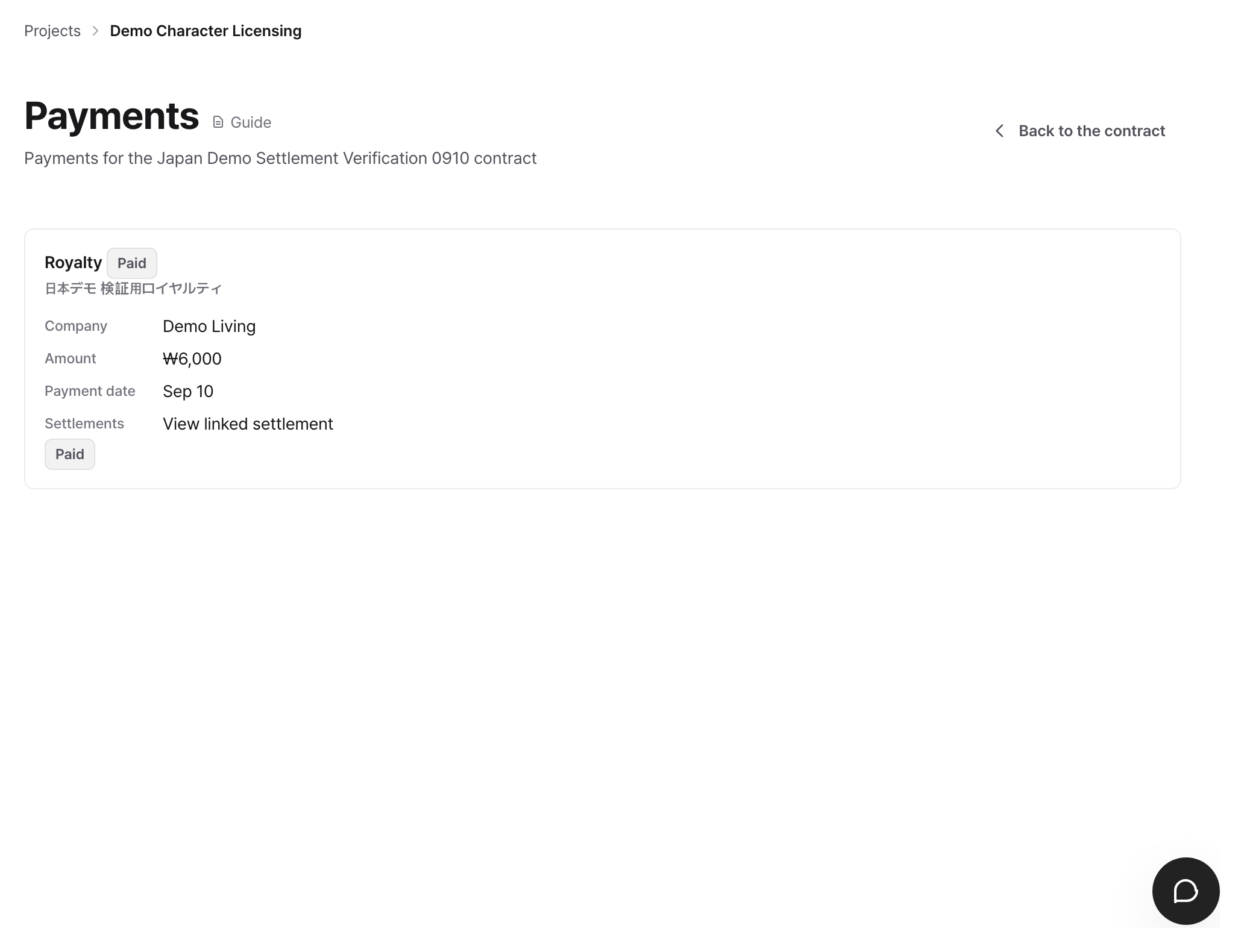
Payments Ledger β€” Royalty generated from issuance remains per transaction

Partners cannot register, modify, or delete payments. If there are any omissions or errors, please contact the IP Provider administrator.


IP Provider/Operator View

Registering Payments

  1. Go to Payments at the bottom of the Contract details.
  2. Click the Register payment button in the top right.
  3. Fill out the form.
Item Description
Payment type Select from Label issuance payments / Additional payments / Royalty
Company Select the Partner to which this payment is attributed
Amount Payment amount (must be greater than 0)
Currency The contract's reference currency is pre-filled
Exchange rate Required if using a currency different from the contract's reference currency
Payment date Date on which the payment occurred or is based. Settlements divide periods based on this date
Memo Notes (optional)
  1. Click Save. Registered payments are created in Label generated, which is the first step of the status flow.

Confirming Payment Deposits

  1. Open the payment details screen.
  2. If it is not yet Paid, the Mark as paid button is displayed.
  3. Clicking Mark as paid changes the status to Paid.
  4. Payments for which the deposit is completed cannot be modified or deleted.
  5. This button does not appear for correction transactions and corrected original transactions.

Starting Settlements

  1. Go to Settlements at the bottom of the Contract details.
  2. Click the Start a settlement button. The screen title is Start a settlement.
  3. Enter the settlement period and the MG applied amount.
Item Description
Start date Start date of the settlement target period
End date End date of the settlement target period
MG applied amount If left blank, automatically calculated based on the contract's MG conditions
Remarks Notes (optional)
  1. Click Save. Upon saving, royalty payments for the corresponding period are automatically aggregated and the amount is calculated. Among payments whose payment date falls within the period, those not yet attached to any settlement are automatically linked to this settlement (regardless of type and status β€” what goes into the subtotals differs from what is visible in the list).

Finalizing Settlements

  1. Check the royalty subtotal, MG applied amount, and final amount on the settlement details screen.
  2. Clicking the Finalize button changes the status from Draft to Finalized.
  3. Settlements cannot be deleted after being finalized.

Confirming Settlement Deposits

  1. Click the Mark as paid button on the finalized settlement details screen.
  2. The status changes from Finalized to Paid.

Exporting Settlement CSV

  • Click the Export CSV button on the Settlements list screen to download the entire list of settlements as a CSV.
  • Included items: Start date, End date, Royalty subtotal, MG applied amount, Final amount, Status.

Status and Rules

Flow of Payment Status Changes

Current Status Action Next Status
Label generated Administrator Mark as paid Paid
Paid None Final status. Cannot be edited or deleted

Label generated is created through two paths β€” royalty payments are automatically created in this status when Labels are issued, and manually registered payments also start in this status.

Flow of Settlement Status Changes

Current Status Action Next Status
Draft Admin does Finalize Finalized
Finalized Admin does Mark as paid Paid
Paid None Final status

Deletion is only possible in Draft. After being finalized, the delete button disappears.

Permission Summary

Task IP Provider Admin General Member (IP Provider/Partner)
View Payments list All Own Payments only
View Payments details Available Own Payments only
Register Payments Available Not available
Edit/Delete Payments Only for manually registered Payments before Paid Not available
Confirm Deposit Available Not available
View Settlements list & details Available Available
Start, Finalize & Confirm Deposit for Settlements Available Not available
Delete Settlements Only in Draft status Not available

Partner members can view the Settlements list and details. However, unlike Payments, Settlements show the entire Contract settlement without company-level filtering.

Payments automatically generated through Label issuance cannot be edited or deleted. The basis for that amount is the Label issuance transaction, and deleting it disrupts the amount calculation for the next issuance. If you need to revert it, use Reverse the issuance on the Label issuance screen.


Common Issues / Precautions

An error occurs stating that the periods overlap when starting a settlements. You cannot create two settlements with overlapping periods for the same contract, and the end date of the previous settlement cannot be the same as the start date of the next settlement. Check the period of the existing settlement and set it with a gap of at least one day.

The settlement amount is less than expected. The royalty subtotal only aggregates Paid royalty Payments within that period. Payments whose receipt has not yet been confirmed are not included in the subtotal, so please confirm the receipt of the Payments before creating the settlements. Label fees and additional Payments are not royalties, so they are not subject to the subtotal in the first place.

The settlement amount is more than expected. This is because MG applied was added on top of the royalty subtotal. If the royalty falls short of the minimum guarantee, the difference is added. The criteria are determined by MG settlement method of the Contracts, and if it is Total, it looks at the cumulative royalties and already billed MGs together rather than just looking at the royalties for this period β€” which is why the amount comes out differently from Per period even for the same period.

I want to delete a Payment, but there is no delete button. There are two cases. The Payment is in the Paid status, or it is a Payment automatically generated by Label issuance. Automatically generated Payments can only be corrected via Reverse the issuance on the Label issuance screen.

Are Label issuance and Payments automatically linked? Yes. When Labels are issued, a corresponding amount of royalty Payments is automatically created in the Label generated status and linked to that issuance record. Partial issuances remain separately as much as they were issued, and their sum becomes the generated amount of that Label. When actual payment is confirmed, please change it to Mark as paid β€” the royalty subtotal only aggregates Paid Payments. Label fees are not automatically created β€” please register them manually if necessary.

Can the applied MG amount be changed manually? If you directly enter the applied MG amount in the settlement start form, that value is saved and reflected in the final amount. If left blank, it is automatically calculated based on the MG conditions of the Contracts.

There is a label fee, but the royalty subtotal is 0. The subtotal only aggregates royalty Payments. Label fees and additional Payments are displayed in Payments not counted of the settlement details and the related payment list, but are not included in the subtotal or final amount.


Related Features